FAQs
Frequently Asked Questions
Enhance Your Online Presence with Social Profile Links
The Snap2Close Portal offers a convenient way for you to showcase your social media presence on your Branded Property Website. By adding your Facebook, Instagram, Twitter, LinkedIn, and Zillow profile links, you can enhance your online presence and connect with potential clients and customers. Here’s how you can easily add your social profile links on the Snap2Close Portal:
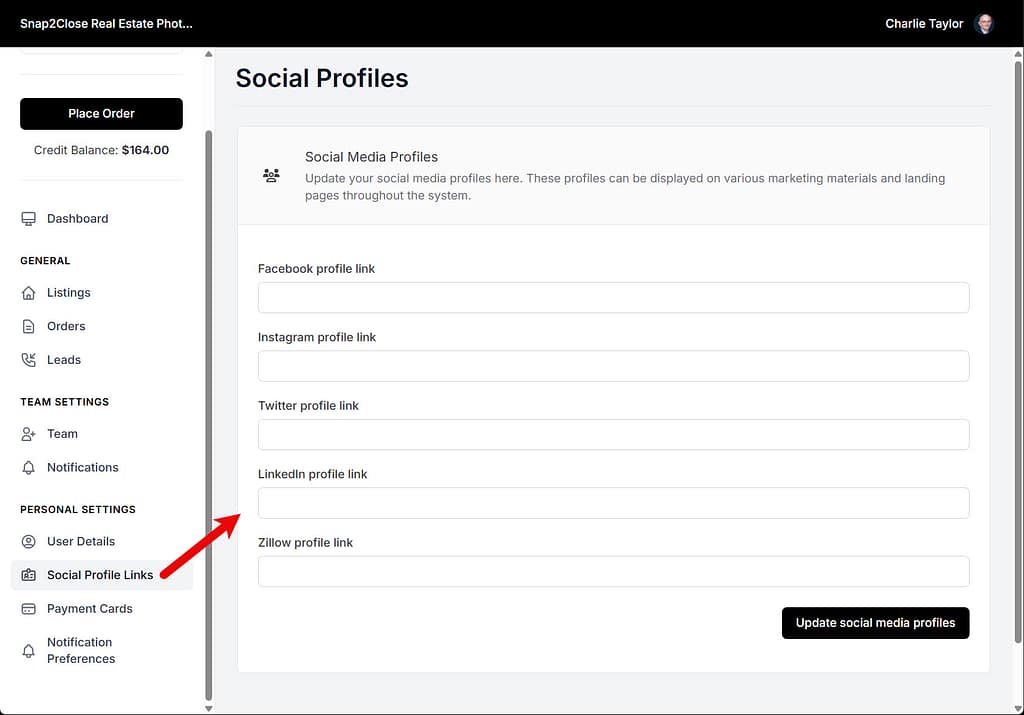
1. Access the Social Profile Links: To begin, log in to your Snap2Close portal account and click on the Social Profile Links icon located on the le menu of the portal.
2. Enter Your Social Media Links: Once you have accessed the Social Profile Links section, you can enter the URLs of your Facebook, Instagram, Twitter, LinkedIn, and Zillow profiles. Simply click on the respective social media platform and input the link to your profile.
3. Save Your Changes: After entering all the necessary social profile links, make sure to save your changes to ensure that the information is updated on your Branded Property Website.
By adding your social profile links on the Snap2Close Portal, you can effectively promote your online presence and engage with your audience. This feature allows you to seamlessly integrate your social media platforms with your property website, making it easierfor potential clients and customers to connect with you. If you have any further questions or need assistance with adding your social profile links, feel free to reach out to our customer support team for help. We’re here to ensure that you make the most out of your Snap2Close experience!