postponing a photoshoot
How to Reschedule a Photoshoot
How to Postpone a Photoshoot
It is important to note that there is a distinct difference between these three transactions:
This webpage is dedicated to Postponing a photoshoot.
Postpone
He process to reschedule a photoshoot is very easy. Please follow these steps:
Step 1: Login to your account
Step 2: Click on the “Orders” icon on the left menu. This action opens up a list of all of your orders and the order’s current status.
Step 3: Click on the Order that you wish to change. This action opens up the order form.
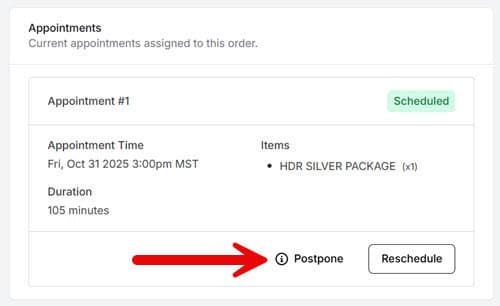
Step 4: Below the 1st section, which is “Order Items and Payments” status, will be an “Appointments” section. At the bottom of this section will be a “Postpone” icon. Click that icon.
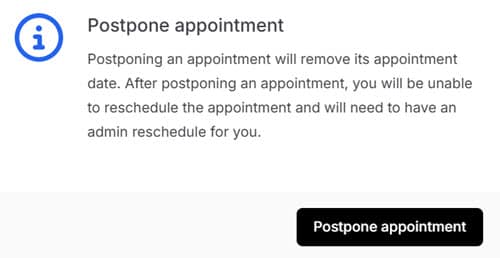
Step 5: This action opens a new message window notifying you that the postponed real estate photoshoot will require to you to contact our office to reschedule the shoot date and time.
Link to Portal Tutorials screen.