portal Navigation
Navigation
Portal Navigation
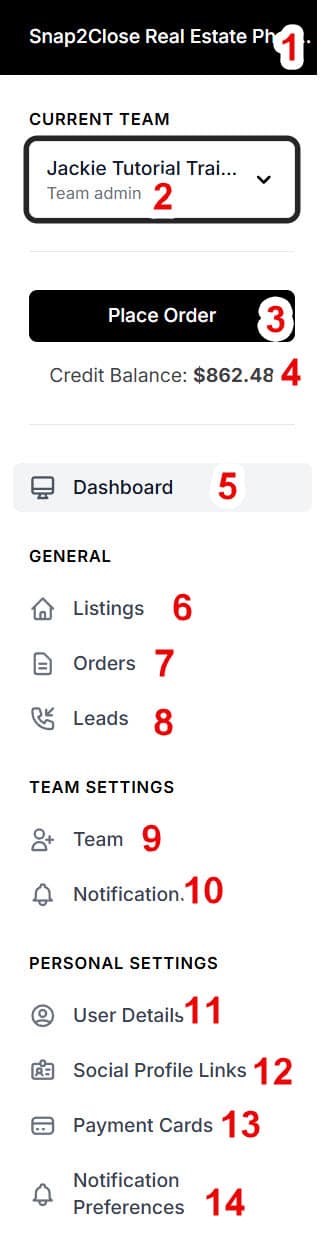
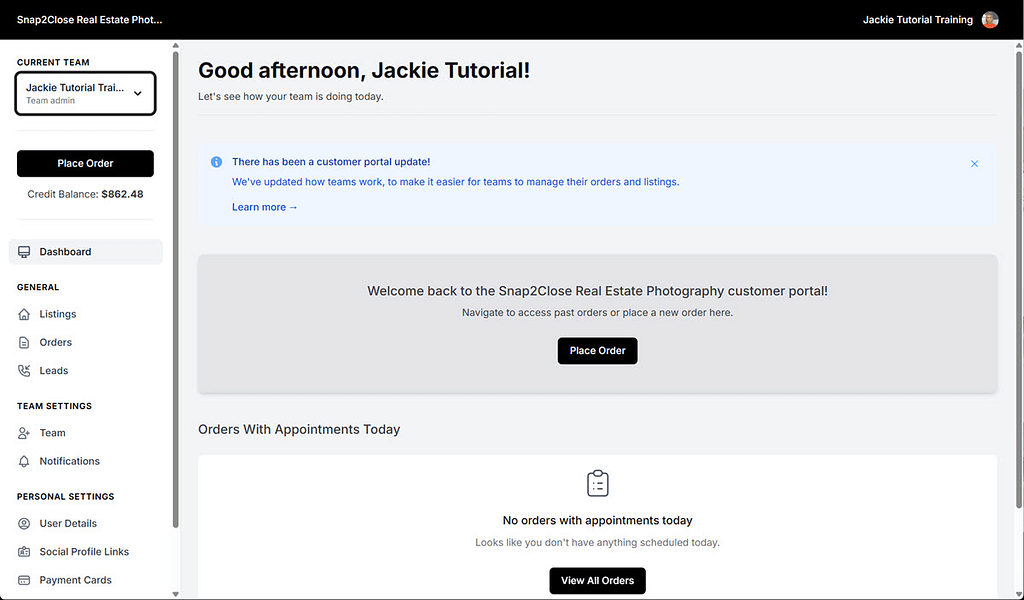
Below is a screenshot of the Dashboard and includes the side menu. The key items for navigation are as follows.
- Please be sure that you on are the Snap2Close Portal. You will find that identification on the top left of the screen.
- You and your Team’s identification: Be sure that you are viewing the correct team. It is not uncommon for more than one real estate agent to be a member of more than one team.
- Black “Place Order” button.
- Credit Balance (if one exists)
- Dashboard: The details the photoshoots scheduled to today.
GENERAL - Listings: Delivered photoshoots are listed in this category.
- Orders: A list of all of your photoshoots orders.
- Leads: A detailed list of people use contacted you through the property websites
TEAM SETTINGS - Team: Add members to your Team.
- Notifications: Decide which Team member is notified on a pre-set list of notifications
PERSONAL SETTINGS - User Settings: Includes your name, email address, phone number and a password reset feature.
- Social Profile Links: Details for your social media links. The links will place the appropriate social media icons on your property websites.
- Payment Cards: This is where you can add or delete your credit card information
- Notification Preferences: Selecting email and/or text methods for each notification.
To learn more about these features then follow the links on our Support webpage