cancelling a photoshoot
How to Reschedule a Photoshoot
How to Cancel a Photoshoot
It is important to note that there is a distinct difference between these three transactions:
This webpage is dedicated to Cancelling a photoshoot.
Cancelling
He process to reschedule a photoshoot is very easy. Please follow these steps:
Step 1: Login to your account
Step 2: Click on the “Orders” icon on the left menu. This action opens up a list of all of your orders and the order’s current status.
Step 3: Click on the Order that you wish to change. This action opens up the order form.
Step 4: At the bottom top section titled ” Order Items and Payments” is a red button titled “Cancel Order. Click that button to cancel your photoshoot.
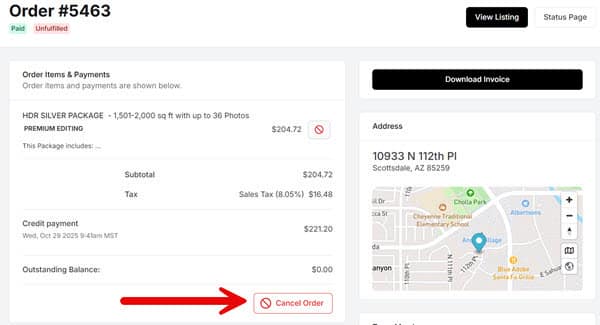
Step 5: If payment have been made then please send an email to Ac********@********se.com notifying them that the order has been cancelled. Please include the Order # and street address. Our accounting office will issue a refund to the credit card account used for the payment.
Link to Portal Tutorials screen.